
Iron Vizzy Spotlight: Chinouk Brings Travel Memories to Life in an Interactive Dashboard.
How Chinouk created a travel dashboard that keeps memories.
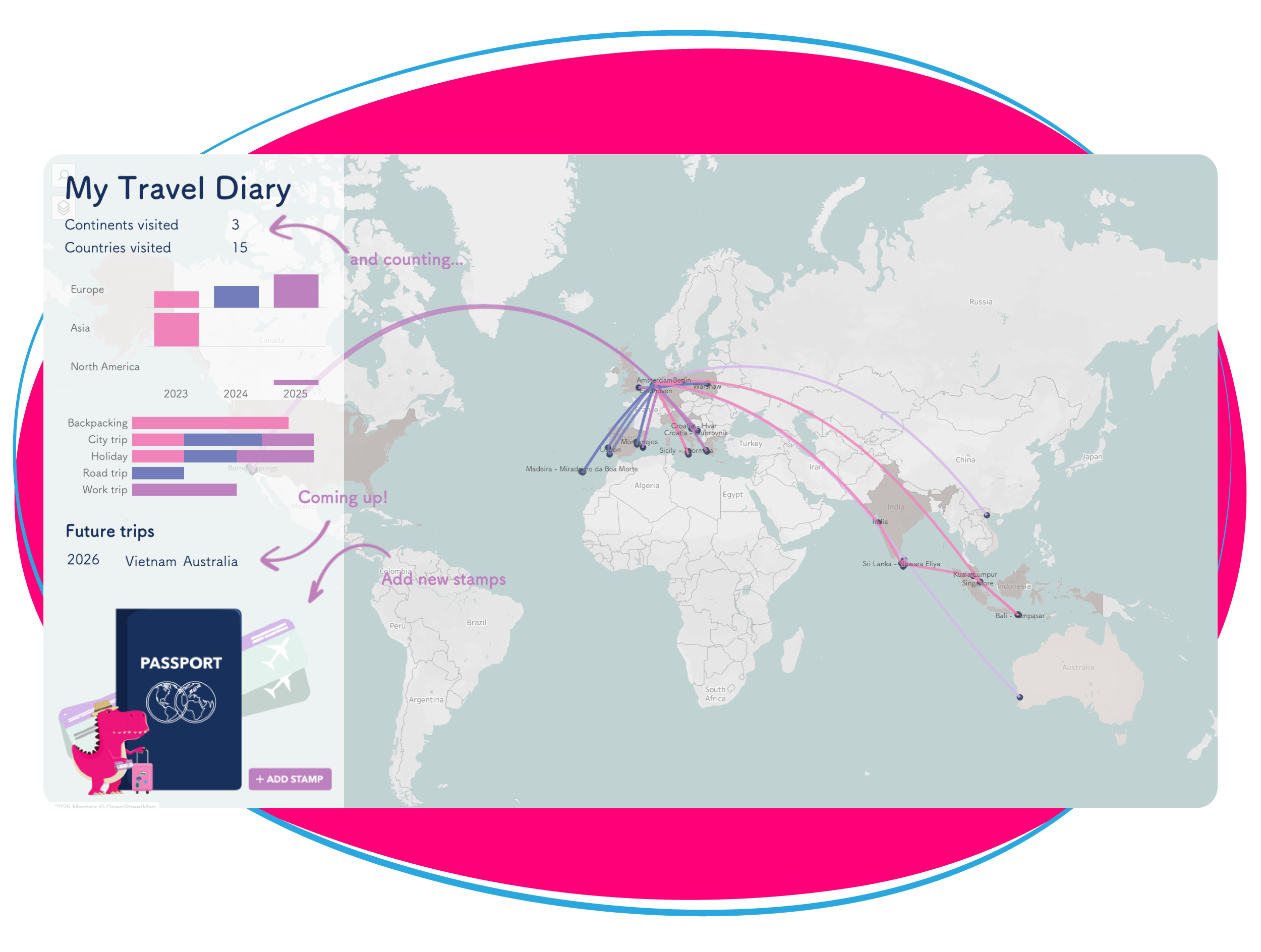
When the Iron Vizzy started, Chinouk was inspired to create a dashboard for one of her favorite things to do: travel. She wanted a dashboard that could collect travel memories in one interactive dashboard. Inspired by her own experiences when using apps and similar dashboards online, she built a tool that combines a map, visualizations, and forms to create a clear overview of her journeys.
This blog walks us through how she built her travel diary in a dashboard in Tableau that can keep travel memories, also for other users. The result is a fully functional dashboard that makes it easy to collect travel memories with data.

A dashboard built for memories.
The goal of Chinouk’s dashboard is to collect memories, track, and visualize her travel experiences. The dashboard called ‘My Travel Diary’ keeps all her travel memories organized together in one place, similar to apps like Polarsteps. The possibility of being interactive with your data in Tableau allows not only tracking past trips, but also adding new future destinations. This makes it possible to not just keep memories of trips that she has already been on, but also look forward to upcoming trips that are planned.
The dashboard is designed in a way that others could also use it as a template for their own travel memories.
Inspiration and the design process.
When starting with the design process, Chinouk drew inspiration from existing aviation and travel dashboards online. From there, she collected her own travel data. She needed to go back in time and find which trips she did for the last three years and collect where she has been, when she travelled, what kind of trip it was, and structuring this data. This took some time to organize.
Once she had all the data collected, which she collected in an Excel sheet, she began with a world map showing travel routes. Using the latitude and longitude she created the lines that show as a travel route on the map. WriteBackExtreme was added to the dashboard to allow the addition of new trips and maintain an up-to-date overview of the travel paths. Later in the process, Chinouk discovered a more efficient way of adding locations; using the WriteBackExtreme’s mapping tool. She did not have time to change this option because of the time that was left and she sees this as a good learning point
After the travel paths were created, she started adding other data visualisations like bar charts and counters to have more inside in the data that is shown on the map. This shows the different continents by year, what kind of trips they were, but also which future trips are planned.
The final step involved choosing the look and feel. The right colors, fonts, and visuals were added, such as arrows and the passport. The passport was added as a button to open and close the WriteBackExtreme form, which also gives the feeling of a travel theme in the dashboard.
Extensions that supported the goal.
The most important Extension in Chinouk’s dashboard is WriteBackExtreme. It stores data and allows to add new locations easily. By using the form, users can put the necessary information in and the travel path will be created on the map. It also updates the other visualizations automatically. This combination of mapping and interactivity creates a complete and dynamic travel overview.

Learning and enjoyment.
Chinouk wanted more than just lines connecting destinations on a map. The additional visualizations provide broader insights and make filtering on the dashboard easier. This helps by gaining insides in the travels in an easy way by highlighting the different connected information across the journeys.
Creating the dashboard helped Chinouk deepen her understanding of Tableau and WriteBackExtreme. Beyond gaining the technical knowledge, she enjoyed creating a personal tool that keeps her memories in one organized dashboard. The experience also demonstrated the flexibility of extensions and how it can be used in different cases.
A dashboard for continued use.
Chinouk plans to continue using the dashboard to track her travels. It now serves as a central place for her memories, combining visualization, interactivity, and personal storytelling in one dashboard.