













Infotopics | Apps for Tableau
VizSlides2026-02-13T11:51:28+01:00

VizSlides

Up-to-date Tableau inside Microsoft Office.

Insert Tableau dashboards and worksheets directly into PowerPoint, Word, Excel, and Outlook. Go from hours of preparation to minutes, without screenshots or static exports!

VizSlides

Turn everyday documents into living analytics.

VizSlides is a Microsoft Office add-in that connects Tableau directly to the tools used every day. Say goodbye to copying and pasting Tableau dashboards and worksheets into your document, redoing the manual work every time the data changes.

With VizSlides, fetch the latest high-resolution visualization at the click of a button. Apply image-specific, parameter, or global filters, and present the right insights with confidence, all without leaving Microsoft Office.

Always up-to-date and easily shared.

Documents can be shared within and outside an organization without a connection to Tableau or installation needed, as the documents contain images of the visualizations. Present and distribute trusted insights, knowing the latest data is always in use!
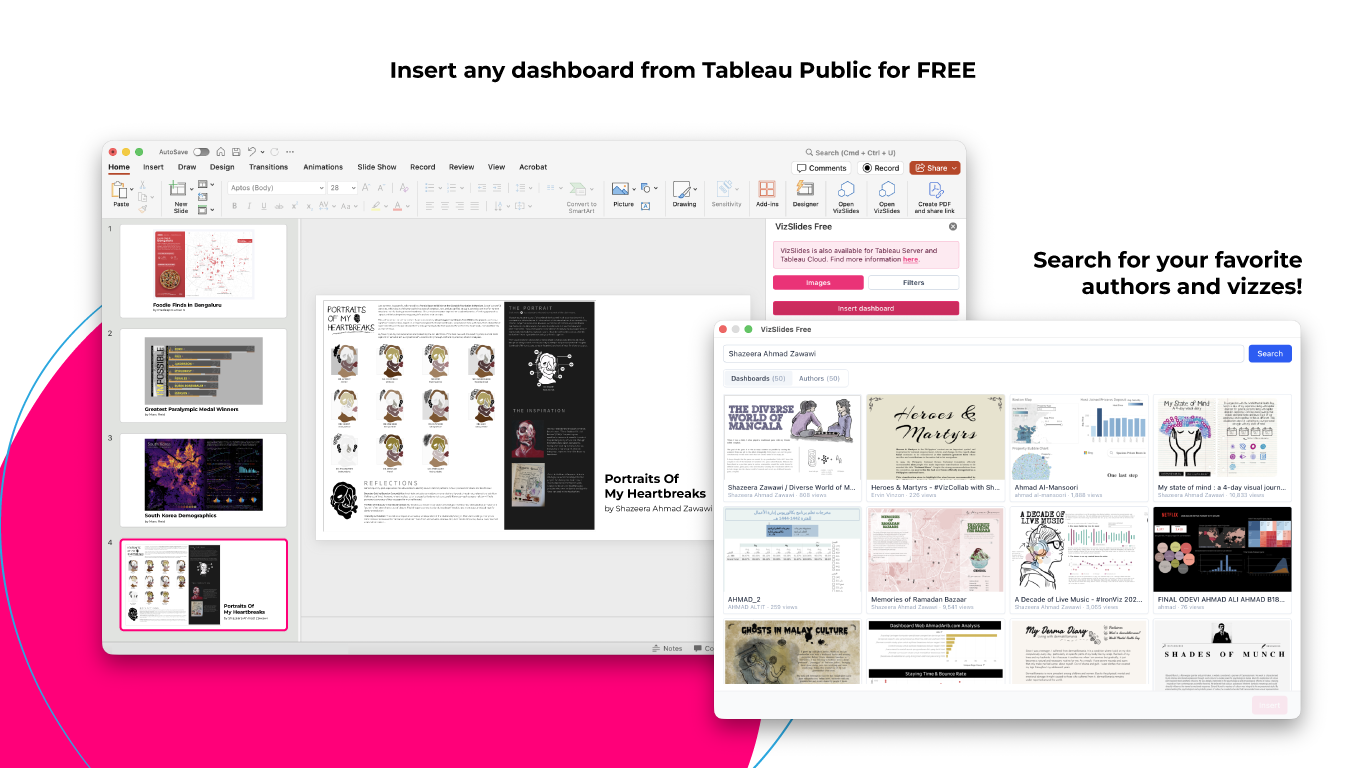
VizSlides Free Microsoft Office

Available for free for Tableau Public.

VizSlides Free allows you to insert any dashboard or worksheet from Tableau Public into your documents.
It’s ideal for sharing interactive insights for education, storytelling, and public reporting.

Countless features for your use case.

Updated Tableau visualizations

Insert Tableau dashboards and worksheets into Microsoft Office. One-click reload for updates.

Flexible
filtering

Use image-specific and parameter filters for tailored views or global filters across multiple images.

Built for
speed & scale

Access all Tableau workbooks within the organization. Fast presentation setup time with crisp visuals.

Enterprise-ready Security

VizSlides uses Tableau Personal Access Tokens (PAT) to provide secure, governed access to workbooks. The presentation creator authenticates once to establish the connection with Tableau.

Anyone opening the document can view the content, but refreshing data or adding new dashboards and worksheets requires the password, keeping access fully controlled.

Personal Access Tokens enable secure authentication without storing Tableau usernames or passwords. VizSlides can run fully on-premises and does not require an internet connection.

Are you ready to try Tableau in PowerPoint?

Try VizSlides for free

Want to experience all the great features from VizSlides?
  1. Open PowerPoint
  2. Get Add-ins via the Insert tab
  3. Search VizSlides
  4. Click on Add

Product Guide

Everything you need to know to get up and running

A free guide to help you get started with VizSlides

Installation Guide

How to install VizSlides in your corporate enviroment.

Installation Guide: 

Data security klaus iso

Secure on-premises solutions.

Governance and Security are among the top priorities in developing Apps for Tableau Products. All products are available as on-premises solutions, and your data and user access is secured under Tableau’s governance.

Apps for Tableau is ISO 27001:2022 certified

VizSlides works with:

VizSlides - Tableau in Powerpoint Add-in - Office 365 Browser on Mac

Office 365 Browser on Mac

VizSlides - Tableau in Powerpoint Mac Desktop

Mac Desktop

VizSlides - Tableau in Powerpoint Windows Desktop

Windows Desktop 

VizSlides - Tableau in Powerpoint Add-in - Office 365

Office 365 Browser

FAQ.

Does this product work on phone and tablet?2023-10-13T12:44:55+01:00

Yes!

What is the difference between PowerPoint Desktop and PowerPoint in the browser?2023-09-28T15:40:07+01:00

PowerPoint in the browser uses a different web engine than PowerPoint desktop, therefore PowerPoint in the browser has all the possible features with VizSlides such as saving filters and parameters, and embedding Tableau Dashboards natively. Because of limitations in PowerPoint Desktop, we are using an innovatie streaming service to enable live and interactive Tableau Dashboards in your PowerPoint presentations. Because of this, saving filters and parameters is currently not available in PowerPoint Desktop (yet).

Does VizSlides work offline?2023-09-28T14:54:22+01:00

Yes, the on-premises version does not require an internet connection to work.

How safe is the product?2024-02-28T16:59:47+01:00

Apps for Tableau products are safe and secure. Our products are penetration tested by an independent company every year, you can request the pentest report by contacting sales. Besides that, our on-premises subscriptions can run fully without the need of a internet connection. You can find more about data security here.

Does Apps for Tableau look at any of my data?2023-10-13T10:29:41+01:00

No this product runs locally on the computer of the client and will not send any data to Apps for Tableau. We also offer on-premises solutions which do not require any internet connection. For more info visit the Data Security page and download the whitepaper. 

Can I get an on-premises trial?2023-10-13T12:42:46+01:00

Yes, you can request an on-premises trial by filling in the form on the pricing page.

Do you offer installation support?2023-10-13T10:28:33+01:00

Yes, you can contact us for the possibilities.

Do you have a partner programme?2023-10-13T10:27:50+01:00

Yes! You can find a partner overview here.

Governed and Secure.

Governance and Security are one of the biggest priorities in developing Apps for Tableau Products. All our products are secure as we comply with ISO 27001 and NEN7510 and our data and user access is secured under Tableau’s governance.